

Travel Preparedness · Helpful Guide
A Small Travel-Day Backup Kit for Lost Bags, Missing Ports, and Hot Waits
A useful travel backup kit covers a few probable failure points without turning a day bag into a second suitcase full of duplicate gadgets.
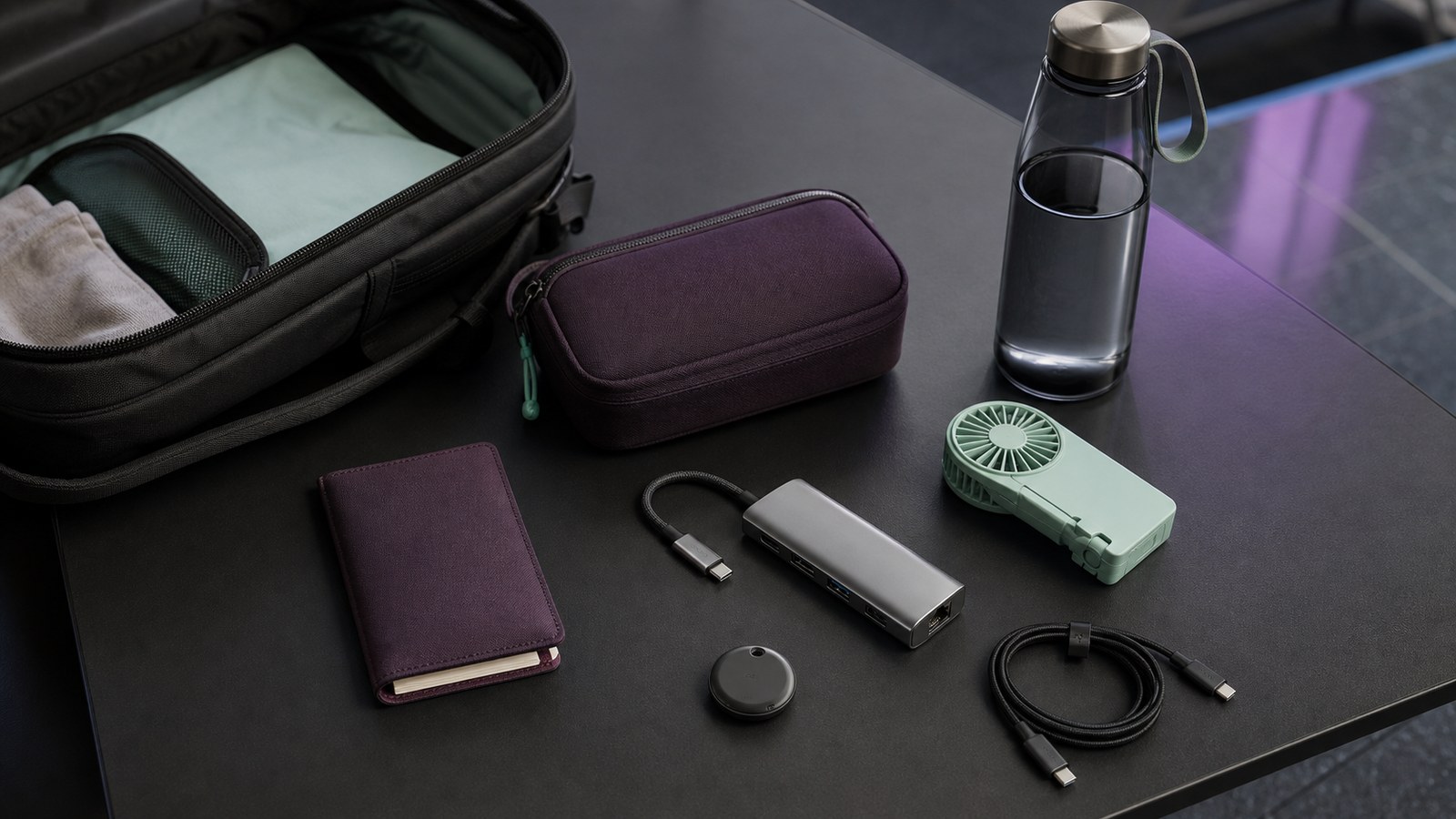
Travel-day backups become cumbersome when every imagined failure earns another gadget. A bag gets heavier, cables and adapters duplicate one another, and the item that actually matters still ends up in the wrong pocket. The most disruptive problems are usually narrower: one important bag cannot be located, a laptop reaches a room without the expected ports, or a hot queue becomes unnecessarily uncomfortable. Each backup should cover a plausible failure without pretending to guarantee recovery, compatibility, or safety.
This compact kit assigns one product to each of those jobs. AirTag adds a Find My signal for compatible Apple users, the Anker 332 hub supplies a verified set of display and data connections for a compatible laptop, and the JISULIFE F8 offers small personal airflow during warm waits. Start with the failure you can name, confirm platform and port requirements, and skip anything that duplicates gear already packed. The comparison below makes those boundaries visible before the individual recommendations.
RizzFinds recommendations
Our top picks
Five current travel products selected around packing, charging, and recovery from common travel-day friction. Missing price, rank, or availability claims are omitted.
JISULIFE
JISULIFE 3 IN 1 Portable Fan with Power Bank & Flashlight
Checking current product details…
Check priceBago
bago 7 Pcs Packing Cubes for Travel - 4 Travel Packing Cubes for Suitcases with 3 ZipLock
Checking current product details…
Check priceShacke
Shacke Premium 5 Packing Cubes Set - Lightweight Mesh Travel Luggage Organizers with
Checking current product details…
Check priceSelections are based on current provider verification and RizzFinds relevance checks. We do not infer bestseller or trending status from Lasso data.
At a glance
Quick comparison
| Helpful find | Best for | Main limitation | Amazon action |
|---|---|---|---|
| Apple AirTag (2nd generation) | Apple users adding a recovery clue to one important bag | Requires a compatible Apple account/device and current software; Precision Finding has narrower device requirements. | View on Amazon |
| Anker 332 USB-C Hub (5-in-1, A8355) | USB-C laptop users who have verified a need for HDMI and USB data ports | USB-C connector shape does not prove display output or charging support; host capabilities must be checked. | View on Amazon |
| JISULIFE F8 pocket fan | Occasional personal airflow during warm queues and transit waits | Personal airflow is not a substitute for shade, hydration, cooling breaks, or medical attention. | View on Amazon |
Helpful find 01
Best for: Apple users adding a recovery clue to one important bag
Apple AirTag (2nd generation)
A useful finding layer for compatible Apple users, not live GPS or a recovery guarantee.
View on AmazonWhat it is
Apple AirTag is a small Find My item tracker using Bluetooth, the surrounding Find My network, NFC Lost Mode, and a replaceable CR2032 battery. It is not continuous GPS.
How it addresses the problem
It addresses uncertainty about one deliberately chosen bag or key item by adding another location clue alongside airline tracing, contact details, photographs, and ordinary custody habits.
How to use it realistically
A realistic use is pairing it before departure, attaching it securely inside the chosen item, confirming the account and software requirements, and treating any map update as a clue to share through appropriate recovery channels.
Strongest relevant benefit
Its strongest relevant benefit is adding a compatible network signal without creating a separate subscription or bulky device. That can improve situational awareness, but it cannot guarantee a live update or recovery.
Important limitation
Requires a compatible Apple account/device and current software; Precision Finding has narrower device requirements.
Skip it if
- You do not use a compatible Apple device.
- You expect continuous GPS-style tracking or guaranteed recovery.
Helpful find 02
Best for: USB-C laptop users who have verified a need for HDMI and USB data ports
Anker 332 USB-C Hub (5-in-1, A8355)
A compact port backup when the host laptop supports the functions you actually need.
View on AmazonWhat it is
The Anker 332 A8355 is a five-in-one USB-C hub with HDMI, two USB-A data ports, one USB-C data port, and USB-C power-delivery input under documented conditions.
How it addresses the problem
It addresses the predictable mismatch between a thin laptop and a room that expects HDMI or USB-A. It is useful only when the host USB-C port supports the intended display, data, or charging function.
How to use it realistically
A realistic use is testing the complete laptop, hub, cable, display, charger, and accessory chain at home, then keeping that verified set together. The hub does not replace a charger or add unsupported host capabilities.
Strongest relevant benefit
Its strongest relevant benefit is consolidating several commonly needed connections into one compact, known adapter. That reduces loose dongles when the documented 4K30 HDMI and data-port limits match the trip.
Important limitation
USB-C connector shape does not prove display output or charging support; host capabilities must be checked.
Skip it if
- The laptop already has the needed ports.
- You require 4K60, Ethernet, SD/microSD, or a port the A8355 does not provide.
Helpful find 03
Best for: Occasional personal airflow during warm queues and transit waits
JISULIFE F8 pocket fan
A compact comfort backup that must not be mistaken for heat-safety equipment.
View on AmazonWhat it is
The JISULIFE F8 is a foldable pocket fan with a small internal battery plus light and emergency power functions identified in the product evidence. It is comfort equipment, not heat-safety equipment.
How it addresses the problem
It addresses short warm waits where a little personal airflow may make standing or sitting more tolerable. It does not address dehydration, unsafe heat exposure, or the need for shade and cooling breaks.
How to use it realistically
A realistic use is charging it before travel, checking carrier battery rules, keeping the guard and controls unobstructed, and using it during a queue or transit pause without relying on its battery for essential phone power.
Strongest relevant benefit
Its strongest potential benefit is compact, self-contained airflow that can fit a day bag. The value is limited to personal comfort because RizzFinds has not verified runtime, airflow, noise, or charging capacity.
Important limitation
Personal airflow is not a substitute for shade, hydration, cooling breaks, or medical attention.
Skip it if
- You expect strong continuous airflow or a full phone recharge.
- The destination is cool enough that the item becomes dead weight.
Lower-cost alternatives
Before you buy anything
Give documents, medication, keys, and charging gear fixed pockets. Save tickets and maps offline. Photograph checked luggage and its tag. Test the complete laptop-to-display connection at home. Check the forecast, terminal transfers, and battery rules before packing.
- Assign fixed pockets for documents, medication, cables, and the item used at security.
- Download boarding passes, reservation details, addresses, and maps before leaving reliable service.
- List the exact ports and cables required by the devices on this trip; pack one tested path for each need.
- Put medication, documents, keys, and one basic clothing layer in the personal item rather than relying on checked baggage.
- Check carrier rules for batteries and prohibited items before leaving.
Alternatives that may already solve it
- A written packing checklist and fixed pouch
- Airline baggage tag and photographed bag contents
- Built-in laptop ports or the destination display's supplied connection
- Shade, water, schedule changes, and cooling breaks
Bottom line
Final recommendation
Start with the repeated problem, then choose only the product whose compatibility, storage, cleanup, and safety limitations fit the way you will actually use it.
Continue solving the problem
Related guides
 Moving & Organization
 Moving-Day Essentials: What to Keep With You and Out of the Truck
Moving day is easier when documents, first-night needs, cleaning basics, and handoff responsibilities stay visible instead of disappearing into a wall of identical boxes.
Read the Helpful Guide